
Animation Desk - Sketch & Draw1.0.48 - Get APK
You'll be able to download in few seconds.
Publisher Description
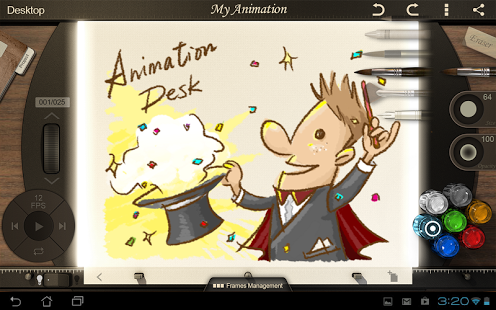
**Anyone can be an animator. Any idea matters.**
-----
You have long heard it from your iPhone/iPad friend now here it is. Hand-drawn animations right on your tablet! No tools needed- just your fingers and Animation Desk and off you go. The drawing interface provided by Animation Desk for Android resembles the real working environment of a professional animator who completes each frame of an animation on a specially-designed desk, the animation desk.
Animation Desk for Android provides an easy, friendly, and intuitive drawing environment so that everyone can enjoy creating their own animated works. Come join us to appreciate the beauty of traditional animations!
THE STAGE IS YOURS! Simply sketch on the screen with your fingers and turn the drawings into animations in just a few steps. You will soon find yourself become the creator of your own fantasy land.
What others have to say about Animation Desk:
“One of the original reasons why I always liked Animation Desk is that you didn't have to be a professional with years of experience or have a degree in design to fully realize the potential of your creativity. The app was created with the beginner in mind so that they'd be making hand-drawn animations in no time.”—AppCraver
“Designed for both amateurs and professional animators, Animation Desk is a versatile app capable of creating intricate animations through an easy to use and intuitive user interface.”-- AppDictions
********************
Main Features:
Friendly and gorgeous user interface
Realistic scene for animation creating
Various painting tools with pressure sensitivity
Pencil, crayon, fountain pen, three types of brush and eraser
Color selection palettes
Give your works life by decorating it with more than 100 vivid colors
Adjustable size and opacity for the brushes and eraser
Manage every stroke to your liking
Background images
Animate your ideas with ease by inserting your favorite picture as the static background
Onion Skinning
See an overlay of adjacent frames
Four sets of frame rate supported
The smoothness of your animation depends on the frame rate and you can choose from 3FPS to 24FPS (frame per second).
Easy file management
Create and manage files under the thumbnail mode
Powerful frame manager
Editing, coping, moving, deleting frames is like a summer breeze
********************
We value your feedback and comments as they help us make Animation Desk better! We also have access to the professional user community and constant refer to them for future product improvements. Talk to us on Facebook and let us know how we could make it better for you!
www.facebook.com/animationdesk
**For instruction and demonstration, please visit our website.
Join our Facebook Page to learn more about our apps!
- Animation Desk: www.facebook.com/animationdesk
- Kdan Mobile: www.facebook.com/kdanmobile
About Animation Desk - Sketch & Draw
The company that develops Animation Desk - Sketch & Draw is Kdan Mobile Software Ltd.. The latest version released by its developer is 1.0.48.
To install Animation Desk - Sketch & Draw on your Android device, just click the green Continue To App button above to start the installation process. The app is listed on our website since 2016-09-26 and was downloaded 0 times. We have already checked if the download link is safe, however for your own protection we recommend that you scan the downloaded app with your antivirus. Your antivirus may detect the Animation Desk - Sketch & Draw as malware as malware if the download link to com.kdanmobile.android.animationdesk is broken.
How to install Animation Desk - Sketch & Draw on your Android device:
- Click on the Continue To App button on our website. This will redirect you to Google Play.
- Once the Animation Desk - Sketch & Draw is shown in the Google Play listing of your Android device, you can start its download and installation. Tap on the Install button located below the search bar and to the right of the app icon.
- A pop-up window with the permissions required by Animation Desk - Sketch & Draw will be shown. Click on Accept to continue the process.
- Animation Desk - Sketch & Draw will be downloaded onto your device, displaying a progress. Once the download completes, the installation will start and you'll get a notification after the installation is finished.
Program Details
System requirements
Download information
Pricing
Version History
version 1.0.48
posted on 2016-09-26
New design UI and high quality brush tools are available on Animation Desk Cloud. It provides an easy, friendly, intuitive drawing environment for Animation creation. It's on Google Play now, you have to try it!,https://play.google.com/store/apps/details?id=com.kdanmobile.android.animationdeskcloud
version 1.0.3
posted on 2013-06-06
Several fixes and updates
Disclaimer
External Download
We do not host Animation Desk - Sketch & Draw on our servers. We did not scan it for viruses, adware, spyware or other type of malware. This app is hosted by Galad and passed their terms and conditions to be listed there. We recommend caution when installing it.
The APK Download link for Animation Desk - Sketch & Draw is provided to you by apps112.com without any warranties, representations or guarantees of any kind, so access it at your own risk.
If you have questions regarding this particular app contact the publisher directly. For questions about the functionalities of apps112.com contact us.
